Verify the unit works BEFORE cutting anything. You can always cut more — you can't un-cut.
0Pre-flight
Don't let the Amazon return window lapse — inspect & test promptly
Tools ready: 7mm socket, T8 torx, L-torx, orange bezel pry tools, Dremel cutoff wheel or small file
iPhone + USB cable on hand for the CarPlay test
Park outdoors (GPS first-fix needs open sky)
1⛔ GATE — Power-test before any cutting
Power the unit on the bench / loosely in dash. No bracket work yet.
Confirm SYNC version = 3.4Settings → System → About SYNC On-screen version is the final word, regardless of seller's claim.
Confirm wired CarPlay handshakes — plug iPhone into the USB hub. CarPlay runs over the USB hub, not Bluetooth.
✅ Boots on 3.4 + CarPlay works → continue to Step 2.❌ DOA or on 3.0 / 3.2 → STOP. Return it. Do NOT trim a bracket on a unit you'll send back.
2Bezel + screen removal
Follow the video's "Bezel Removal" chapter.
Remove trim pieces, then bezel screws (7mm)
Remove the SYNC 2 screen
KEEP the SYNC 2 brackets — the kit reuses them
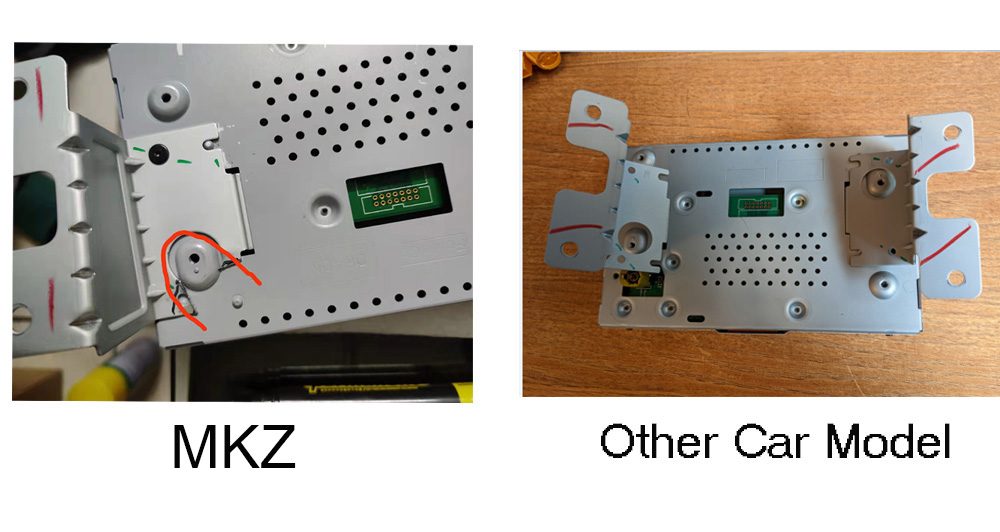
3Bracket trim — the one MKZ cut
Seller photo: on the MKZ bracket, the tab near the lower mounting post (circled red) gets removed. Green = alignment reference, NOT cut lines.
Seller's reference — red circle = cut, green = alignment
Bracket photo not found. Upload bracket.jpg to this folder, or check the seller-message screenshots.
Trim that one tab only — minor, localized. Not dash cutting.
Go slow: remove a little → test-fit → repeat
4Install
APIM module
Screen (mated to unit) + LVDS cable
USB media hub (the CarPlay port)
GPS antenna (optional — you phone-nav). Stick the kit's puck high near the windshield, no metal directly above it. Factory GPS already exists (in the trunk deck lid) — leave it; just use the kit's. No drilling: route coax behind existing trim, don't pinch it.
Reconnect main connector fully (lever all the way), reseat in dash, replace bezel screws
Note: The APIM was VIN-programmed by the seller — factory onboard nav may not carry over to SYNC 3. That's fine for you (you always phone-nav; CarPlay nav works regardless).
5Tempered glass screen protector
Apply only AFTER the power-test passed and touch is confirmed working — don't cover a screen you might return. Easiest with the screen in a stable position; do it before final bezel snug if you can.
Screen powered, touch confirmed working (don't apply to a return candidate)
Clean screen fully — wipe, then dust pass; no fingerprints or specks (trapped dust = permanent bubble)
Dry-align first: position the glass without peeling, check the fit
Peel backing, set one edge down, let it fall flat — don't press the middle first
Push bubbles out to the edges; small ones often self-clear in a day
6Master reset (AFTER install)
Per kit instructions. Wipes settings — don't run it mid-diagnosis.
Settings → General → Master Reset
7📷 Rear-camera fix (FORScan) — only if needed
Trigger: backup camera shows a black screen after install. Easiest path: let the seller do it remotely (📧 above). DIY steps below.
⚠️ Read first: The exact as-built address/value depends on your specific APIM's data, which can't be confirmed until the unit is installed and read. Steps below are the correct general approach (enable the analog/NTSC rear-camera input). Confirm the specific line/value against your unit or the seller before writing. A wrong as-built write can glitch other APIM functions.
Install FORScan (request the free extended trial license if prompted — needed for as-built edits)
Plug the ELS27 / OBD cable into the OBD-II port; connect FORScan; ignition on (engine off fine)
Let FORScan ID the vehicle, then open the APIM module
Go to the APIM Configuration / As-Built section
Locate the rear-camera / camera-type config line (digital vs. analog/NTSC)
Change the value that enables the analog (NTSC) input — exact line/value confirmed against your unit or seller
Write the change → key off → wait ~1 min for modules to sleep → key on
Test reverse — camera image should display
8✅ Final function check
SYNC version reads 3.4
CarPlay over USB
Rear camera (after fix if needed)
Climate controls
Steering-wheel controls
Heated / cooled seats
Bluetooth audio
Android Auto (optional)
9📶 Phase 2 — Wireless CarPlay (CarlinKit Mini Ultra 3)
Do this only AFTER wired CarPlay is proven. ✅ Verified Ultra 3 (listing + "3" on barcode). Return window through Jul 24, 2026. One unit per car (MKZ + Silverado); keep the spare as a known-good swap.
How the firmware page works: The dongle makes its own Wi-Fi network; when wireless CarPlay is active your phone is on it. 192.168.50.100 is the dongle's own local page — no internet needed. It will only load while your phone is connected to the dongle; any other time it errors (expected, not broken). If it doesn't load while properly connected, the exact IP for your unit is in the manual PDF above.
Wired CarPlay already proven on the MKZ (don't add the dongle until this passes)
Plug dongle into the SYNC 3 USB hub (USB-A, direct — no converter needed)
One-time wired pairing: follow the dongle's first-run prompt, iPhone connected by cable
Once paired, leave dongle permanently plugged in; phone connects to it wirelessly thereafter
Update firmware via the browser URL (no app) before relying on it — fixes stability/heat
Test wireless: expect ~10–23s handshake at startup (not instant like wired)
Connector: USB-A, plugs into the SYNC 3 hub directly. The included USB-A→C converter isn't needed here.
Spare-swap plan: two identical units (MKZ + Silverado). If one acts up, swap the known-good one from the other car to isolate dongle vs. car.
Update before relying on it: firmware fixes stability and the Ultra 3's heat. Do it before a road trip, not during.
Expect minor quirks: occasional drop/reconnect is normal for this category; usually fine on SYNC 3.
90° angled plug: non-issue in the MKZ (dongle lives on the hidden hub); just don't let it block a port you want on the Silverado.
!Known MKZ gotchas (expected, not faults)
Active Park Assist will NOT work post-swap (all vendors). Everything else retained.
CarPlay = USB hub, not Bluetooth. Use the supplied port for the handshake.
GPS first-fix is slow and needs open sky.
📋 Report back to Claude
Fill the amber fields above as you go — they gather here automatically. Tap Copy, then paste into the chat.